How to Build a UX Research Process That Drives Results

TL;DR: UX Research Process
A UX research process is a six-phase approach, define goals, choose methods, recruit, conduct, analyze, implement, that keeps research from becoming scattered feedback.
- The return: Teams that put 10 % of a project budget into usability see a 135 % improvement in key metrics, according to Nielsen Norman Group.
- Sample size: Five to seven users per segment for usability tests, 100 or more responses for a survey.
- Budget: A usability round with six users costs 0 to 300 euros in incentives and 15 to 25 hours of time.
- The bias: The biases that corrupt findings and how to avoid them get their own section.
- For whom: A solo product manager or a research team, the process scales.
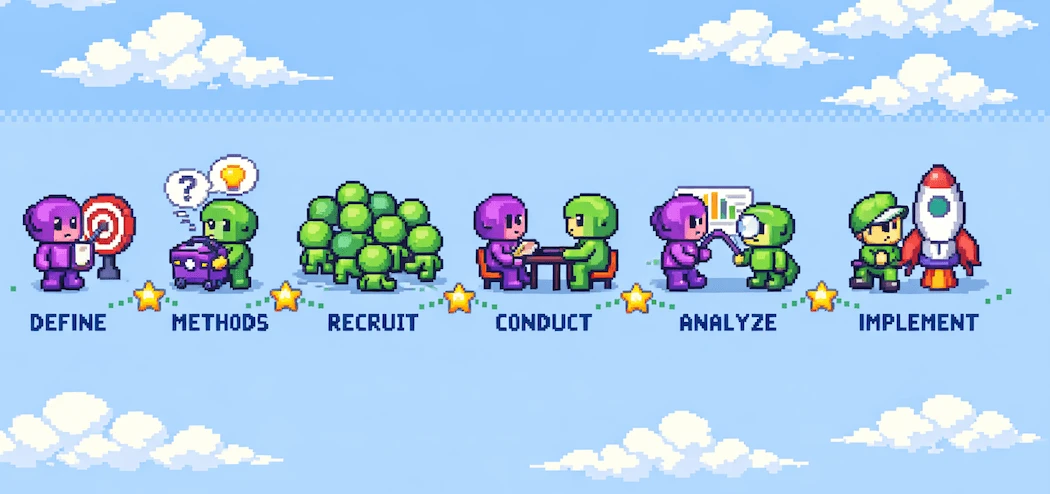
A UX research process is a systematic 6-phase approach to understanding users: define goals, choose methods, recruit participants, conduct research, analyze findings, and implement insights. Teams that follow a structured process reduce development waste and build products users actually need.
Here's the problem: most teams skip structured research. They run a few interviews when time permits, gather scattered feedback, and call it research. The result? According to Nielsen Norman Group research, teams that invest just 10% of their project budget in usability see a 135% improvement in key metrics. That's massive ROI that teams leave on the table when they skip process for speed.
This guide gives you the complete framework. You'll learn how to structure your research phases, allocate budgets, determine sample sizes, and avoid the biases that corrupt findings. Whether you're a solo product manager or leading a research team, this process scales to your needs.
What Is the UX Research Process?
The UX research process is a structured approach to understanding user needs, behaviors, and pain points before building solutions. Unlike ad-hoc research where you talk to users when problems arise, a systematic process ensures continuous insight gathering that shapes every product decision.
The distinction matters because ad-hoc research reacts to problems. Structured research prevents them.
"So there are two buckets of user research. The first one is generative research and that is the problem space, understanding the problem space."
Nikki Anderson, Zalando
Generative research explores what to build. Evaluative research tests whether you built it right. Your process needs both, timed appropriately across the product lifecycle. Most teams over-index on evaluative research (testing designs) while under-investing in generative research (understanding problems). A balanced process corrects this.
For a comprehensive overview of all available techniques, see my guide to user research methods.
The 6-Phase UX Research Process
Here's the framework that works across team sizes, budgets, and product stages. Each phase builds on the previous one.
Phase 1: Define Research Goals
Start with questions, not methods. The most common mistake is deciding to "run some user interviews" before clarifying what you need to learn. That's backwards.
Good research goals answer: What decisions will this research inform? A goal like "understand our users better" is useless. A goal like "identify the top 3 friction points in our checkout flow" guides every subsequent choice.
Write your goals as specific, answerable questions:
- Why do users abandon checkout at the payment step?
- What mental models do users have about our pricing tiers?
- Which features do power users rely on that casual users ignore?
These questions determine your method, sample size, and analysis approach. Get them right and the rest follows.
Phase 2: Choose Methods and Timeline
Method selection depends on your research question, timeline, and budget. Here's a decision framework:
| Research Goal | Best Method | Timeline | Sample Size |
|---|---|---|---|
| Understand user problems | User interviews | 2-3 weeks | 8-12 per segment |
| Test a design or flow | Usability testing | 1-2 weeks | 5-7 per segment |
| Validate at scale | Surveys | 1-2 weeks | 100+ responses |
| Compare design options | A/B testing | 2-4 weeks | Statistical significance |
| Understand context | Contextual inquiry | 3-4 weeks | 5-8 participants |
Notice that different goals require different methods. Trying to understand deep user problems through a survey wastes everyone's time. Testing a specific flow with 50 interviews wastes budget. Match method to goal.
Phase 3: Recruit Participants
Recruitment makes or breaks research quality. Talk to the wrong users and your insights lead you astray.
"When I say talk to five to seven users, it's five to seven users per segment."
Nikki Anderson, Zalando
The "per segment" qualifier is critical. If your product serves enterprise admins and individual users, you need 5-7 of each for usability testing. Five users total where three are admins and two are individuals tells you nothing reliable about either group.
According to Nielsen Norman Group, 5-7 users uncover 85% of usability issues within a segment. Beyond that, you hit diminishing returns.
Write screener questions that filter for:
- Recency of use (active users vs. churned)
- Frequency (daily users vs. occasional)
- Technical skill level
- Role or use case
Exclude employees, investors, and friends. You need fresh eyes, not friendly ones. For detailed guidance on crafting effective questions, see my user interview questions guide.
Phase 4: Conduct Research
Execution determines whether you get real insights or confirmation of what you already believe. Two factors matter most: avoiding bias and choosing the right setting.
Remote vs. In-Person Research
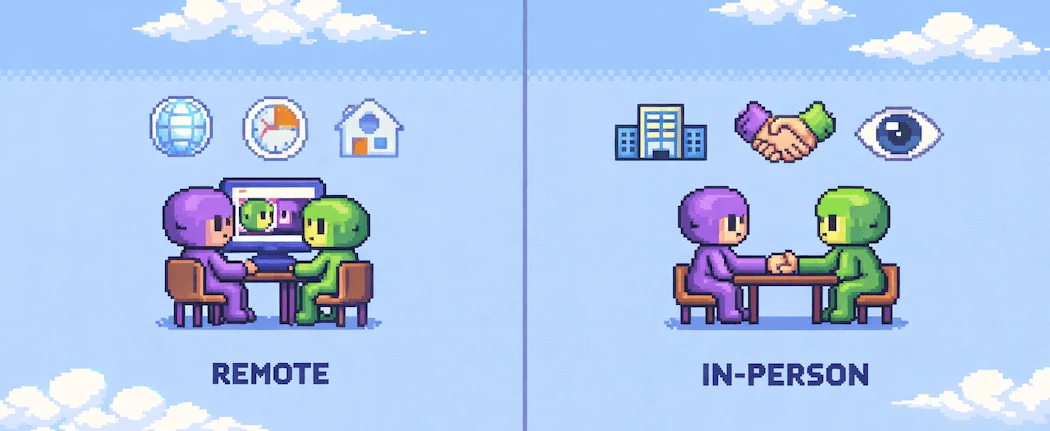
| Factor | Remote | In-Person | Cost |
|---|---|---|---|
| Lower (no travel, no venue) | Higher (logistics, space) | Recruitment pool | Global, diverse |
| Local, limited | Body language | Partially visible | Fully visible |
| Natural context | User's real environment | Controlled setting | Best for |
| Digital products, software | Physical products, hardware | For most digital products, remote research is the default. You recruit from a wider pool, capture behavior in users' natural environment, and reduce costs. Reserve in-person research for hardware testing or when physical context matters. | During sessions, your job is to observe, not help. Use think-aloud protocol: ask participants to narrate their thoughts. When they struggle, resist the urge to intervene. Their struggle is your data. |
Good research is part of customer discovery. It helps you understand not just how users interact with your product, but why they need it in the first place.
Phase 5: Analyze and Synthesize
Raw notes don't inform decisions. Synthesized patterns do.
After each session, tag observations by type:
- Pain points: Where users struggled, expressed frustration, or failed tasks
- Goals: What users were trying to accomplish
- Motivations: Why they wanted to accomplish it
- Workarounds: Hacks users employ to get around limitations
Then conduct affinity diagramming. Group related observations across participants. A single user struggling at one point is an anecdote. Three users struggling at the same point is a pattern worth acting on.
Modern synthesis tools can accelerate this process. AI-assisted tools like Dovetail, Notably, and Condens help identify patterns across transcripts. They don't replace human judgment, but they reduce the time from data to insight.
Rate each finding by severity:
| Severity | Definition | Action |
|---|---|---|
| Critical | User cannot complete the task | Fix before launch |
| Serious | User completes with significant difficulty | Fix in current sprint |
| Minor | User notices but works around it | Add to backlog |
Phase 6: Report and Implement
Research that sits in slide decks helps no one. Make findings impossible to ignore.
Structure each finding as:
- Problem: What happened
- Evidence: How many users, what they did/said
- Recommendation: What to change
Clip video highlights. A 10-second clip of a user struggling beats 10 pages of analysis. Invite stakeholders to observe live sessions. Watching changes minds faster than reports.
Connect findings to decisions: "This finding means we should..." not just "we learned..." Research should feed directly into product discovery and shape your roadmap priorities.
Budget and Resource Framework
Most teams assume research requires a dedicated team and six-figure budget. It doesn't. Here's what research actually costs.
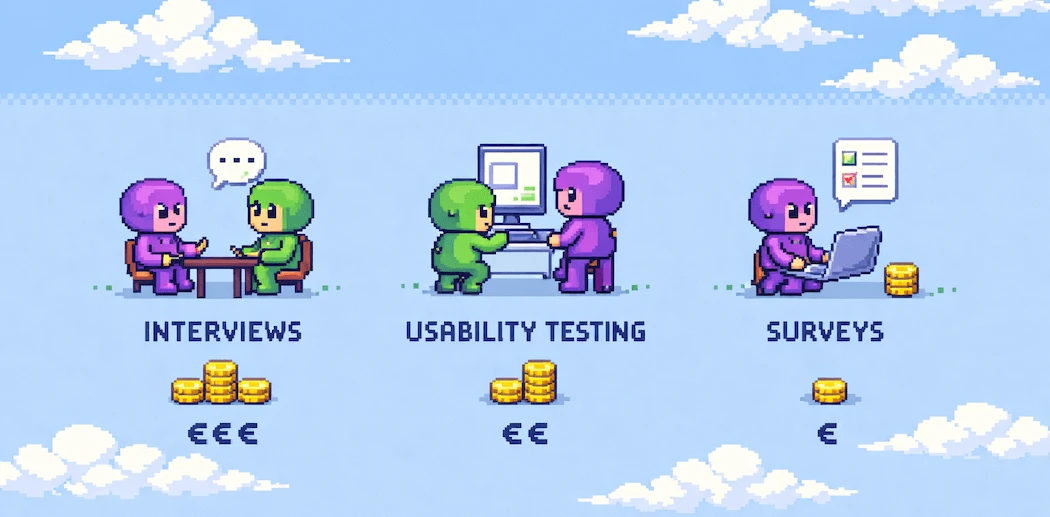
| Method | DIY Cost | With Agency | Time Investment |
|---|---|---|---|
| User interviews (8) | €0-500 (incentives) | €5.000-15.000 | 20-30 hours |
| Usability testing (6) | €0-300 (incentives) | €3.000-10.000 | 15-25 hours |
| Survey (100+ responses) | €0-200 (tool + incentives) | €2.000-8.000 | 10-15 hours |
| Contextual inquiry (5) | €200-1.000 (travel + incentives) | €8.000-20.000 | 40-60 hours |
When to hire vs. DIY:
- DIY: You have product/design team members who can dedicate time. Good for ongoing, embedded research.
- Hire freelancer: You need expertise for a specific project but don't need full-time capacity.
- Hire agency: You need a large study, specialized methodology, or external credibility for stakeholder buy-in.
Budget-friendly alternatives:
- Guerrilla testing in coffee shops (free coffee as incentive)
- Unmoderated remote tools like Maze or Lyssna (free tiers available)
- Internal dogfooding with non-product teams
- 5-second tests for quick design validation
Even €0 budget beats no research at all.
Avoiding Research Bias
Bias corrupts research at every stage. Here are the three most damaging biases and how to prevent them.
Confirmation Bias
You see what you expect to see. You interpret ambiguous data as supporting your hypothesis. You remember findings that confirm your beliefs and forget those that don't.
"This is, I would say, the biggest failure you see. Typically, which means if you have a hypothesis, you get so attached to it, you start only looking for the positive signals and start ignoring the negative signals."
Vikas Seth, ID Now
Prevention:
- Have someone else analyze your data independently
- Actively look for evidence that contradicts your assumptions
- Document hypotheses before research, then honestly assess findings against them
- Include a devil's advocate in synthesis sessions
Leading Questions
The way you ask shapes the answer you get. Subtle wording changes skew results completely.
"You should never really ask a user, hey, did you ever try to press this button?"
Christian Strunk, Product Bakery Podcast
That question plants an idea. The user now thinks about that button differently than they would have naturally.
Prevention:
- Use neutral phrasing: "How would you..." not "Would you like it if..."
- Ask about past behavior, not future intentions
- Test questions with colleagues before sessions
- Review recordings to catch yourself leading
Survivorship Bias
You only hear from users who stuck around. The churned users who could tell you what went wrong are gone.
Prevention:
- Actively recruit users who churned or almost churned
- Talk to users who evaluated but didn't buy
- Include non-users in your research plan
Building Research Culture
The most effective teams don't do research as a one-time project. They build it into their weekly rhythm.
Continuous discovery means weekly user contact, even if brief. Teresa Torres recommends talking to users every single week. Small, consistent doses compound into deep understanding that occasional deep dives can't match.
Start with one simple change: schedule 2-3 user conversations per week. Make it a recurring calendar event that doesn't get bumped. In a month, you'll have more user insight than most teams gather in a quarter.
Research isn't a phase that ends. It's an ongoing practice that shapes how your team thinks about products and users.
Getting Started This Week
You don't need perfect conditions to start. Here's your 6-step launch plan:
- Pick one flow in your product that you suspect causes friction (highest traffic, most support tickets, or newest feature)
- Write three specific questions you want to answer about that flow
- Recruit 5 users who match your target segment (use your own customer list)
- Run 30-minute sessions using think-aloud protocol
- Tag findings by pain point, goal, and motivation
- Share one video clip and three prioritized recommendations with your team
That's it. One afternoon of structured research reveals more than months of internal debate.
For detailed guidance on running your first test, see my user testing guide. For the full set of user research methods beyond this process, explore my full overview.
The teams that ship great products don't guess. They research. And they start before they're ready.